
As an Amazon Associate, I earn from qualifying purchases.
LIONWEI 14-in-1 USB-C Docking Station Review: The Ultimate Triple Display Hub for Modern Laptops.
Introduction
Building an efficient workspace can easily turn into a frustrating puzzle of cables, dongles, and mismatched adapters. If you use a modern laptop, you already know the struggle firsthand. Hardware manufacturers are stripping away standard ports faster than ever, leaving us with a minimalist chassis that looks great but forces us to carry around a bag full of accessories just to plug in a basic flash drive.
Suddenly, connecting your favorite mechanical keyboard, a couple of external monitors, and a camera’s SD card requires half a dozen separate accessories dangling off the side of your machine. I’ve spent plenty of time trying to solve this exact problem, sorting through various hubs to find something that actually handles a heavy workflow without constantly dropping the connection.
The LIONWEI 14-in-1 USB-C Docking Station caught my attention because it promises to route everything through a single, neat USB-C connection. It sounds like the perfect fix for productivity enthusiasts who want a seamless desktop experience while retaining the portability of a laptop. Let’s take a closer look at what this versatile dock offers and see how it holds up under the pressure of a multi-monitor, high-demand daily routine.
Key Features & Specifications
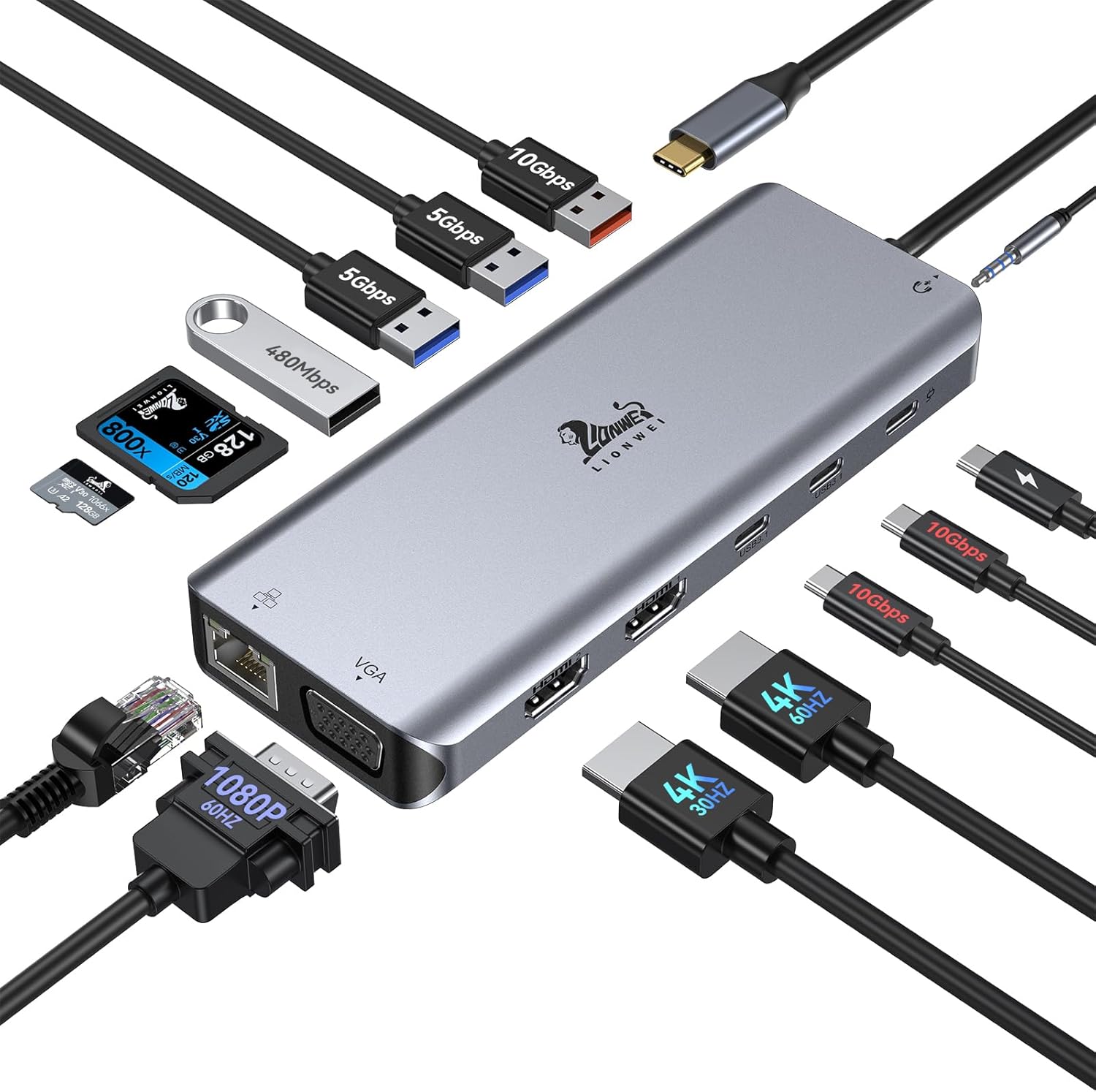
Before getting into the day-to-day experience, it helps to know exactly what kind of connectivity you are working with. This hub covers an impressive amount of ground:
- 14 Distinct Ports: Consolidates almost every connection you could possibly need into one compact unit.
- Triple Display Support: Features dual 4K HDMI ports alongside a 1080p VGA port for expansive multi-monitor setups.
- 100W Power Delivery (PD): Passthrough charging to keep your main device powered up during intense use.
- Gigabit Ethernet: Provides a stable, hardwired internet connection.
- Versatile USB Configuration: Includes a mix of USB-C 3.1, USB-A 3.1, and standard USB 3.0/2.0 ports.
- Media Storage Readers: Dedicated slots for both SD and TF (MicroSD) cards.
- Audio Jack: Standard 3.5mm port for external speakers or wired headphones.
Performance and Real-Life Use
Having 14 ports on a spec sheet is one thing, but how a dock handles traffic in the real world is what really matters. When you are multitasking, you don’t want your mouse to stutter just because you are transferring a large video file to an external drive. I am happy to report that the LIONWEI hub balances the load remarkably well.
Connecting two external monitors via the dual HDMI ports expands your digital workspace instantly. For remote workers juggling spreadsheets, Slack channels, and browser tabs, the extra screen real estate is a massive productivity booster. Even when running video streams on one monitor while editing documents on another, the display signals remain stable without flickering.
Data transfers feel incredibly snappy thanks to the higher-speed USB 3.1 ports. Pulling gigabytes of photos off an SD card happens in a fraction of the time it takes with older, cheaper dongles. Meanwhile, the inclusion of basic USB 2.0 ports is a smart touch—they are perfectly suited for wireless mouse and keyboard receivers, which often experience interference when plugged into faster USB 3.0 slots.
Design & Build Quality
Nobody wants a cheap, plastic accessory cluttering up an otherwise premium desk setup. LIONWEI clearly understood this by opting for a sleek, metallic finish. The aluminum alloy casing does more than just match the aesthetics of modern laptops like MacBooks and XPS machines; it serves a functional purpose as well.
Pushing dual monitors, gigabit internet, and multiple data streams generates heat. The metal chassis acts as a passive heatsink, drawing warmth away from the internal components. While the dock certainly gets warm to the touch during heavy use, it never reaches alarming temperatures or throttles performance. The form factor is surprisingly slim for how much tech is crammed inside, making it easy enough to slip into a backpack if you need to take your command center to a coffee shop or a coworking space.
Ease of Use and Setup
One of the biggest selling points of the LIONWEI 14-in-1 is the plug-and-play functionality. You won’t find yourself hunting down obscure driver downloads from sketchy websites just to get your monitors working. You simply plug the main USB-C cable into your compatible laptop, and your operating system recognizes the peripherals almost instantly.
It is worth pointing out a quick technical detail regarding how different computers handle multi-monitor setups. On Windows machines, the dock supports true extended displays across multiple screens. Due to Apple’s inherent limitations with Multi-Stream Transport (MST) on standard M-series chips, Mac users will typically see their external displays mirrored rather than extended to three separate screens. This isn’t a flaw with the hub itself, but it is an essential detail to keep in mind depending on the hardware you use.
Special Features and Innovation
What sets this specific hub apart from the sea of basic dongles is its willingness to support legacy hardware right alongside cutting-edge tech. It’s rare to find a modern USB-C docking station that still includes a VGA port.
While VGA might seem outdated to some, countless offices, schools, and older presentation rooms still rely on older projectors and monitors. Having that VGA port ready to go means you will never be caught off guard before a big presentation. The hub bridges the gap between the modern USB-C era and the dependable displays of the past.
Power Delivery and Efficiency
Battery anxiety is a real issue when you are running high-performance tasks. Pushing pixels to two extra monitors drains laptop batteries incredibly fast. Thankfully, this hub features up to 100W Power Delivery passthrough.
By plugging your laptop’s powerful USB-C charger directly into the dock, you power the hub’s internal chips while simultaneously sending a strong charge straight to your computer’s battery. This one-cable solution means you sit down at your desk, plug in a single cord, and suddenly your laptop is charging, wired to the internet, connected to speakers, and pushing video to multiple screens. When it is time to leave, unplugging that single cord frees you instantly.
Pros & Cons
Pros:
- Incredible port variety handles almost every peripheral imaginable.
- Sturdy aluminum casing dissipates heat effectively.
- 100W Power Delivery keeps your main device charged under heavy loads.
- Gigabit Ethernet provides a highly stable alternative to spotty Wi-Fi.
- True plug-and-play experience without annoying software installations.
Cons:
- Mac OS users are limited by macOS MST restrictions for extended multi-displays.
- The unit can get noticeably warm during maximum load.
- Cable connecting the dock to the laptop is somewhat short, limiting desk placement options.
Who Should Buy This Product
This docking station is an absolute lifesaver for work-from-home professionals, digital creatives, and students who treat their laptop as their primary computer. If you are tired of the daily routine of plugging and unplugging five different cables every time you sit at your desk, this device changes the game.
It is also a brilliant choice for hybrid workers. Having the LIONWEI hub stay permanently on your desk with all your monitors, keyboards, and network cables attached turns your portable laptop into a full desktop workstation in less than three seconds.
Final Verdict
Finding a reliable bridge between a minimalist laptop and a complex desk setup can be a chore, but the LIONWEI 14-in-1 USB-C Docking Station makes the process remarkably smooth. It strips away the clutter and simplifies your workflow, all while feeling premium and durable.
While Apple users should be mindful of the external display limitations baked into macOS, Windows users will find this to be an incredibly potent tool for maximizing screen real estate. The blend of high-speed data transfer, reliable power delivery, and diverse port options makes it a powerhouse accessory. If you want to transform a single USB-C port into a true command center, this dock definitely deserves a spot on your desk.
As an Amazon Associate, I earn from qualifying purchases.